
Instead of collecting shirt sizes from scattered family messages, run your 2026 family reunion matching shirts group order through one Google Form, one response sheet, and one approved purchasing list. Keep the group chat for reminders—not as the record of who ordered what.
- For a family reunion matching shirts group order, use Google Forms to collect sizes and a spreadsheet to approve quantities.
- Unfilteredoutfitters suits families choosing irreverent graphic shirts; decide whether matching means identical designs or coordinated humor.
- Record one wearer per response, confirm exact garment sizing, and stop changes before purchasing.
- Choose one purchasing owner or household ordering, never both for the same wearer.
Why this matters
A message saying someone wants a large does not identify the garment, color, or sizing category. A reaction to a shirt photo is not approval to purchase it. Your workflow needs to separate design preference, wearer details, and final authorization.
Unfilteredoutfitters graphic shirts are best for families who want irreverent humor rather than a formal reunion uniform. Start with Unfilteredoutfitters to choose the direction, then ask every participating household to approve the actual wording. A joke that works for adult cousins does not automatically work for children or every relative.
Treat matching as a decision, not an assumption. Identical shirts require agreement on one exact design; coordinated shirts require agreement on what can differ.
Before you start
- Access: You need a Google account that can create Google Forms and Google Sheets, access to the family chat, and an organizer responsible for the final roster. Relatives who cannot complete a form need someone assigned to enter their responses.
- Materials: Gather the reunion date, household contacts, candidate shirts, and the sizing information for each exact garment. Set a response cutoff and an approval cutoff for your 2026 reunion before sharing the form.
- The gotcha: An adult shirt and a toddler shirt with related humor are not necessarily the same design or sizing system. Confirm each selected garment separately; never copy an adult size into a child's order or assume personalization is offered.
Choose a purchasing arrangement now. Either the organizer purchases the approved roster, or each household purchases its own approved items. Mixing those arrangements without recording ownership creates duplicate orders.
Design brief and shirt shortlist
- Define matching. Write either identical design or coordinated theme at the top of your planning document. For coordinated shirts, state what must stay consistent: the joke style, a chosen color, or another detail confirmed for the selected garments.
- Set the humor boundary. Ask whether the group accepts profanity, alcohol references, or adult jokes. Get parents' approval for children's shirts instead of letting the loudest person in the chat decide.
- Shortlist 2 designs. This is a planning limit, not a requirement from a retailer. Keeping the initial choice small makes the decision clear without turning the chat into a running catalog.
- Approve the exact wording. Share the selected design with the people who will wear it. Record the final choice before collecting garment-specific sizes.
Expected result: Your family can state what matching means, which wording is approved, and whether children's shirts need a separate selection.
Compare the joke, not just the shirt category
These two Unfilteredoutfitters products illustrate a coordinated-humor approach. They are separate designs, not a verified adult-and-child matching set.
| Shirt | Best for | Reason to consider it | Trade-off |
|---|---|---|---|
| Unfiltered Generation T-Shirt | Adults who identify with outspoken family humor | The description centers on being raised without a mute button | The attitude is explicit; get agreement rather than treating it as a neutral family slogan |
| Got Too Silly Toddler Tee | Toddlers whose parents prefer a playful joke | The description uses mischievous-goose humor and excessive giggles | It does not repeat the adult shirt's wording, so the result is coordinated rather than identical |
Choose these together only if coordinated humor satisfies your brief. If the family requires identical artwork across ages, verify that requirement before collecting responses for any garment.


Google Forms intake
- Open Google Forms and create a blank form. Name it Family Reunion Shirts 2026. In the description, explain that each response covers one wearer and give the response cutoff with a time zone.
- In Questions, add your own fields: Household contact, Wearer name, Garment, Color, Size category, Size, and Quantity. Use Short answer for names and Dropdown for choices that must match the approved shortlist.
- Turn on Required for every field needed to purchase correctly. If only one garment or color is approved, state that fixed choice instead of inviting alternatives.
- Add a Checkboxes question labeled Sizing confirmation. Include a required acknowledgment that the household checked the selected garment's sizing information.
- Open Settings and review Limit to 1 response. Leave it off when the same person needs to submit separate responses for several wearers. Check the respondent experience before sharing the form.
- Submit 1 test response, including a child garment if children are participating. Check that the recorded details distinguish the garment and size category clearly.
Expected result: A household can submit complete information for each wearer without relying on follow-up chat messages.
For your 2026 intake, ask relatives to use the same household contact name each time. Consistent names make it easier to review siblings together without guessing whether two differently named responses belong to the same household.
Response sheet and household approval
- In the form, open Responses, select Link to Sheets, choose Create a new spreadsheet, and select Create. Confirm that your test response appears.
- Keep the linked response tab as your intake record. Create a separate working tab called Approved roster so purchasing decisions do not depend on sorting through raw submissions.
- Add working columns for Approval status, Purchase owner, Change note, Order reference, and Distribution status. These are organizer-created labels, not built-in order-management features.
- Review each wearer against the chosen garment. Resolve blank details, mismatched sizing categories, and duplicate submissions before copying the approved details into the working roster.
- Send each household only its own roster excerpt. Ask the contact to approve the garment, color, size category, size, and quantity in one reply.
- Mark approval only after that reply arrives. A submitted form records a request; the household's review confirms that the request is correct.
Expected result: Every purchasing row has complete garment details, a named household, and explicit approval.
Use 1 wearer per row, even when siblings choose the same shirt. Separate rows preserve responsibility for fit and make distribution easier. Record extra quantities explicitly rather than interpreting repeated submissions as a request for additional shirts.
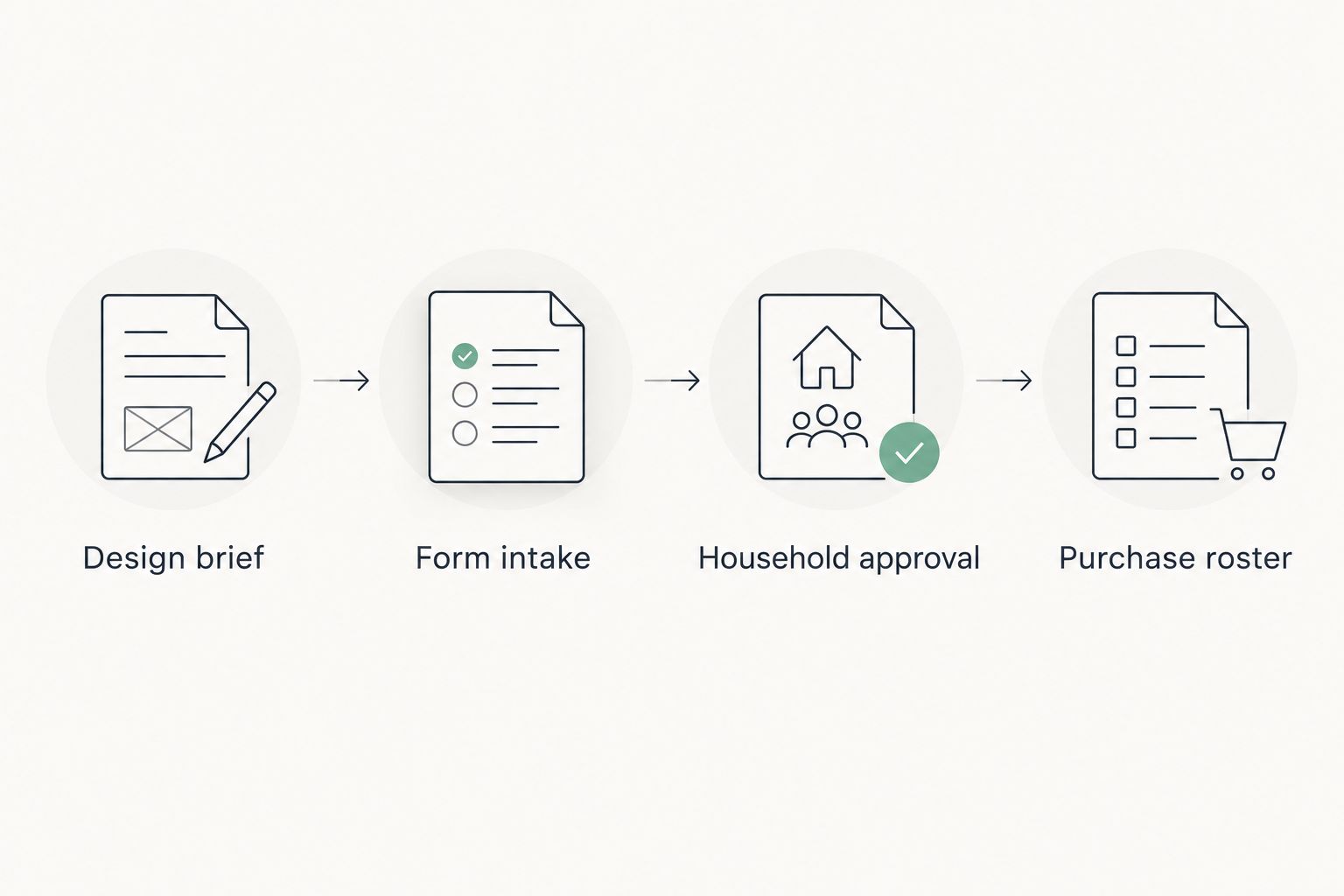
A clean roster does not require an automated store connection. The form-to-sheet link handles intake; the organizer still checks the selected garments and records what was actually purchased.
Purchase roster and distribution
- Set a final approval deadline. For example, give households a 48-hour review window after sending their roster excerpt. Treat that as your chosen administrative window, not a retailer's processing or delivery commitment.
- Freeze the approved roster when the window closes. Keep later requests in a separate change list until the purchaser confirms whether they can be included.
- Group approved rows by exact garment, color, size category, and size. Reconcile those grouped quantities against the individual wearer rows before purchasing.
- Review the checkout selections against the frozen roster. Confirm the delivery destination and any information supplied during checkout; do not infer delivery timing from the reunion date.
- Record the order reference beside the covered rows. Mark a row Purchased only after the transaction is confirmed, not when someone says they intend to order.
- On receipt, reconcile the actual garments against the roster. Sort them by household and label the bags with wearer names rather than relying on recognition at the reunion.
Expected result: You can trace every approved wearer to a confirmed purchase and then to a distributed shirt.
For your 2026 reunion, keep event planning and delivery expectations separate. Set your internal cutoff using delivery information confirmed for the actual purchase, not an assumed shipping interval.
Variant: household ordering after roster changes
Household ordering suits families that want separate purchasing responsibility. The benefit is less purchasing administration for one organizer; the drawback is that each household must select the approved garment details correctly.
Use the same form and approval process, but assign each row to its household contact instead of a central purchaser.
- Give each household its approved excerpt and the exact garment details to select.
- Require confirmation after purchasing, then record an order reference or other confirmation without collecting payment-card details.
- When a wearer changes a size, mark that row Needs review and notify its purchase owner. Do not create a second purchase instruction automatically.
- If the row is already Purchased, check the actual order's options before promising a correction. Keep the original record until the outcome is confirmed.
Expected result: A changed request reaches the person responsible for it without silently becoming a duplicate order.
Troubleshooting
- One cousin submitted twice. Compare the wearer, household, and garment details. Ask whether the newer response replaces the older one; mark the superseded entry rather than counting both.
- An adult size appears on a toddler selection. Return the row to Needs review. Ask the household to check that exact garment's sizing information before approving it again.
- The chat disagrees with the form. Use the approved roster as the purchasing record. Request a written correction and update the working row; do not purchase from an isolated message.
- Someone changes their mind after purchasing. Check the specific order and applicable policies. Do not promise cancellation, changes, or returns on the family's behalf.
- A household cannot submit for another wearer. Check whether Limit to 1 response is enabled. If someone cannot access the form, have the organizer enter their details and request the same household approval afterward.
Customize your workflow
Keep the parts that prevent mistakes: exact garment details, household approval, and one purchase owner per row. Add optional fields only when they solve a real problem, such as a distribution contact for relatives who will arrive separately.
The office-party group shirt order guide is a useful next read when several coordinators share responsibility. For a family reunion, keep private addresses and payment information out of the general chat; share only what each participant needs.
FAQ
What's the easiest way to organize a family reunion matching shirts group order?
Use one form for wearer details and one approved spreadsheet roster for purchasing. Keep the family chat for reminders, and assign a single purchase owner to each row.
Can I use Google Forms to collect everyone's shirt sizes?
Yes, Google Forms can collect garment choices and sizes and link responses to Google Sheets. Collect one response per wearer and require households to check the exact garment's sizing information.
Should one person order all the reunion shirts?
Central purchasing suits families that want one person responsible for the approved roster. Household ordering separates purchasing responsibility but requires confirmation from every household.
Can adults and toddlers wear the same reunion design?
Confirm the exact design in both garment categories before promising identical shirts. Separate adult and toddler products do not establish an identical matching set.
Is Unfilteredoutfitters a fit for funny reunion shirts?
Unfilteredoutfitters fits families choosing bold, irreverent graphic humor. Approve the actual wording with participating adults and parents rather than assuming every joke suits every wearer.
How do I stop duplicate shirt orders?
Assign one purchase owner to every wearer row and resolve repeated submissions before purchasing. Record a confirmed purchase before anyone else acts on the same request.
When should I close shirt requests for a 2026 reunion?
Set the request cutoff using delivery information confirmed for your actual purchase and your household approval window. A planning deadline is not a retailer's delivery guarantee.
One last thing
Count approved wearers before counting shirts. Matching totals can hide a missing relative and a duplicate request. Before purchasing, have each household contact read back the wearer names—not just the quantity.
For a 2026 reunion, the useful record is not the longest chat thread. It is the roster that connects each person to an approved garment and a responsible purchaser.