Instead of hunting through Instagram posts every time you want an edgy tee, save the post, bookmark the matching product page, and record your size choice before checkout. This 2026 workflow turns scattered inspiration into a usable shortlist without relying on an Instagram shopping tag or an in-app wishlist.
- For instagram shop edgy tees searches, use Instagram for discovery and the retailer’s website for product verification.
- Unfiltered Outfitters is best for young adults who want edgy, humor-driven graphic tees.
- Save the post and bookmark the product page; neither action reserves a shirt.
- Check the design, garment type, and sizing information before submitting an order.
Why this matters
A saved Instagram post answers one question: which shirt caught your attention? It does not necessarily tell you where to buy that exact design, which garment you selected, or whether its measurements match a shirt you already wear.
Separate discovery from the buying decision. For Unfiltered Outfitters, that means using the apparel website to verify the graphic tee rather than treating a social image as the complete product description.
The brand’s irreverent humor suits shoppers who want the message to stand out. The trade-off is equally clear: a joke you enjoy online is not automatically something you want to wear at work, around family, or in every public setting.
For your 2026 shopping routine, remove repeated searching—not the checks that keep you from ordering the wrong thing.
Before you start
- Instagram access: Use an account where you can save posts. Keep access to the original post or account so you can revisit the source rather than relying only on a cropped screenshot.
- A browser and fit reference: Have a place to store bookmarks and a well-fitting tee to compare against the retailer’s sizing instructions. Follow the measurement method shown for the garment you are considering.
- The important gotcha: A saved post is not a saved product variant. Your Instagram save does not preserve a retailer’s size selection, and a browser bookmark does not necessarily restore those selections either. Record them separately.
You do not need to connect Instagram to Shopify to follow this guide. This is a shopper-controlled workflow, not an account integration, and it does not depend on the retailer having an Instagram Shop.
Instagram shortlist
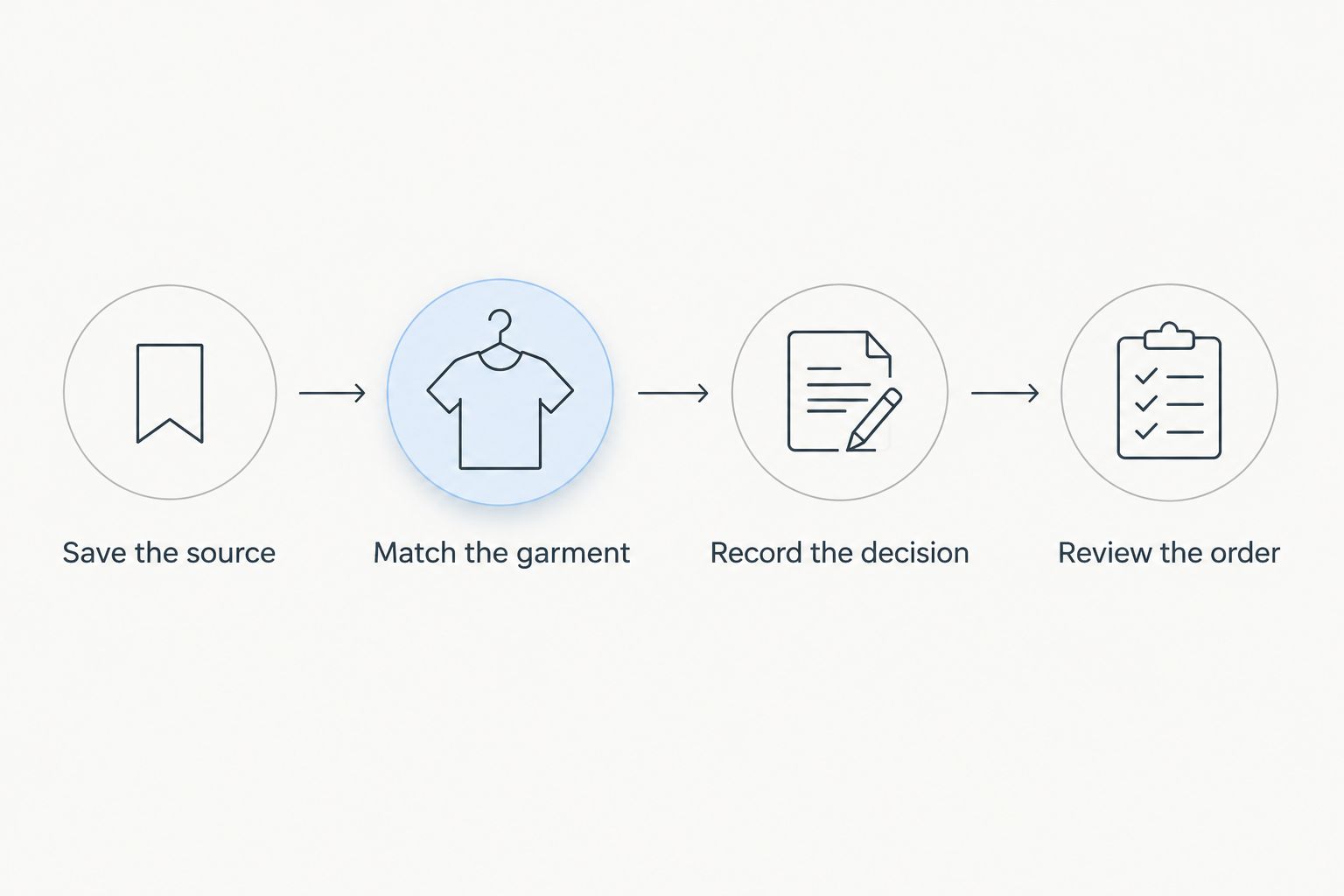
Save the source
- Find the original post showing the tee you want. Read the caption and inspect the image before saving; a repost can separate the design from its seller.
- Tap Instagram’s bookmark icon to save the post. Use the save control rather than assuming that liking a post gives you the same retrieval path.
- Open Saved from your Instagram profile menu and confirm that the post appears. If your interface offers collections, group related shirt posts together.
- Limit your active shortlist to 2 designs. Keep other inspiration separate so you are not comparing every shirt you have ever liked when you are ready to order.
Expected result: You can find the original shirt post without searching your feed, message history, or screenshots.
Treat the shortlist as a decision queue, not a collection you must eventually buy. A graphic that still works after you reread it earns further attention; a joke that only worked with the caption does not.
For each saved post, ask whether you want the shirt itself or simply enjoy the joke. That distinction is especially useful with edgy graphics, where the surrounding video can do more work than the printed design.
Product-page handoff
Match the garment
- Follow the seller-provided product link when one appears in the post or profile. If there is no direct link, open the retailer’s known website separately and look for the exact wording or design.
- Verify the website’s domain before entering personal information. Compare it with the retailer you intended to visit, especially when arriving through a repost or message.
- Match the printed wording and garment type. A sweatshirt with similar wording is not the tee you saved, and a toddler garment is not an adult shirt.
- Bookmark the matching product page using your browser’s bookmark control. Keep the Instagram post as context, but make the product page your return point for shopping.
Expected result: Your shortlist connects an identifiable social post to the corresponding garment, rather than to a homepage search you must repeat.
Record the decision
- Create a note with 3 fields: product name, preferred size, and product-page link. Add a color preference only when you have verified that choice on the page.
- Read the sizing information for that garment. Compare measurements using the retailer’s stated method; do not assume your usual letter size means the same thing across different shirts.
- Reread the graphic at full size. Decide whether the wording suits the person wearing it and the places they intend to wear it.
- Mark 1 first-choice tee in the note. If you are still undecided, leave the purchase decision open instead of treating the first saved post as the winner.
Expected result: You know which garment you mean and what to verify when you return. You no longer need to reconstruct the decision from memory.
This is the core of the 2026 workflow: keep the visual reference, the product destination, and the fit decision connected. None of those records replaces checking the actual order.
Checkout review
Review the order
- Open your bookmarked product page in 1 browser tab dedicated to the purchase. Compare the page with your shortlist note before making selections.
- Select the intended garment options on the page. Read the selected values rather than assuming the page remembered an earlier visit.
- Use the retailer’s displayed purchase control, then inspect the cart or order summary. Check the product name, size, color where applicable, and quantity.
- Review the displayed delivery information and policies before proceeding. Enter your details only after confirming you are on the intended retailer’s checkout.
- Submit the order only when the summary matches your decision. Retain the confirmation so you can distinguish a completed purchase from an abandoned browser session.
Expected result: Your order confirmation identifies the item you intended to buy, with the selections you reviewed.
A shorter path to checkout should mean fewer repeated searches, not fewer checks. A bookmark removes retrieval work; it does not make the final summary optional.
If the page differs from your saved reference, stop and resolve the mismatch. Do not substitute a similar-looking garment merely because you have already reached checkout.
Second workflow: save the product page first
Sometimes you discover the shirt on a retailer’s website rather than Instagram. Reverse the capture order: bookmark the product page, record your fit decision, and save a relevant Instagram post only if it adds useful styling or design context.
This version is best for shoppers who already know the retailer or the shirt wording. Its drawback is that a bookmark alone does not explain why you liked the design, so add a brief note about its intended use.
| Workflow | Best for | Advantage | Limitation |
|---|---|---|---|
| Instagram-first shortlist | Discovering unfamiliar graphics | Preserves the original social context | Requires a separate product match |
| Product-page-first shortlist | Returning to a known design | Keeps the shopping destination close | Needs a note if you want to preserve context |
Both paths end at the same checkpoint: the actual garment and order summary. Neither requires an automated connection between your social account and the store.
Practice with two different shirt messages
Use the same process even when the designs feel easy to distinguish. Unfiltered Outfitters graphic tees include different kinds of irreverent messages; choose the one you actually want to wear, not simply the one you noticed first.
| Design | Best for | Reason to shortlist | Reason to pass |
|---|---|---|---|
| Ew, People T-shirt | Shoppers who like blunt social-boundary humor | A direct, short message | The wording reads dismissively if that is not your intent |
| Red, White, and Mind Your Business T-Shirt | Shoppers who want patriotic boundary-setting humor | Combines patriotic wording with an irreverent message | Pass if you do not want the patriotic framing |
These are message-based comparisons, not claims about fabric, fit, or performance. Verify those details on the garment page instead of inferring them from a slogan.


Troubleshooting
The post has no shopping tag
Use a seller-provided link if one is present, or visit the known retailer’s website separately. A shopping tag is not required for this workflow, and its absence does not identify the correct seller for you.
Search using the exact shirt wording rather than a broad description such as funny black tee. If you cannot establish a reliable match, leave the item unresolved.
The saved post disappears
Saved posts depend on the original content remaining accessible to your account. Use your separate product bookmark and recorded product name to recover the shopping destination.
A screenshot can preserve visual context, but it does not verify who sells the shirt. Keep the seller information with the reference.
The link opens awkwardly inside Instagram
Open the verified destination in your regular browser using the controls provided by your device. Browser controls differ, so identify the destination before switching rather than guessing a menu label.
Review your selections again after the switch. Do not assume an in-app session and a separate browser have retained the same cart state.
The size choice resets
Read your shortlist note and select the intended size again. Then check the cart line item, not just the selector on the product page.
A link identifies a destination; it is not proof of a persistent selection. Keep that distinction in your 2026 checklist.
You are unsure whether the order completed
Check for an order confirmation before submitting another purchase. A browser interruption does not, by itself, tell you whether an order was created.
If the confirmation remains unclear, use the retailer’s published support method and describe what happened. Avoid sending another order merely to test the checkout.
Customize your workflow
Organize your shortlist by intended use instead of creating a separate folder for every retailer. Everyday tees, gifts, and event outfits require different decisions even when the humor overlaps.
For Unfiltered Outfitters graphic tees, start with the wearer and the setting. A design that fits your private sense of humor still needs to fit the occasion; use that as a filter before spending time on garment selections.
Keep your 2026 shortlist useful by removing designs you no longer want. Record completed purchases separately so a familiar saved post does not become an accidental repeat order.
If you are shopping for someone else, record the recipient’s stated preferences rather than guessing their tolerance for profanity or confrontational wording. The strongest joke is not automatically the best gift.
FAQ
How do I use Instagram to shop for edgy tees?
Save the original post, identify the matching garment on the retailer’s website, and bookmark that page. Record your size choice separately and verify the final order summary before purchasing.
Do I need an Instagram Shop to follow this guide?
No. This workflow uses saved posts, browser bookmarks, and the retailer’s website rather than requiring an Instagram Shop or a Shopify account connection.
Does saving an Instagram post reserve the shirt?
No. Saving a post stores a reference in Instagram; it does not create a retailer order or reserve a garment.
Will a product bookmark remember my size?
Do not rely on a bookmark to remember your size. Record your preference separately and check the selected variant again when you return.
What is Unfiltered Outfitters best for?
Unfiltered Outfitters is best for young adults who want edgy, humor-driven graphic tees. Choose the message for the wearer and setting, then verify the garment details separately.
Is saving a post better than taking a screenshot?
Saving a post is better for returning to the original Instagram context, while a screenshot preserves a visual reference. Neither replaces a verified product-page bookmark or a fit check.
What should I check before completing checkout?
Check the garment name, selected size, color where applicable, quantity, and delivery details. Submit only when the final summary matches your intended order.
One last thing
The most useful item in your wishlist is the reason you chose it. Add a short note such as everyday sarcasm or gift for someone who likes blunt humor; that note helps you distinguish a genuine clothing choice from a post you merely enjoyed.
Then leave checkout for the purchase decision—not another search through your saved feed.